Smartphone based

Real-time vehicle tracking built for mobile teams

Track vehicle locations live, monitor routes and activity, and manage fleet operations from a web dashboard using driver smartphones.

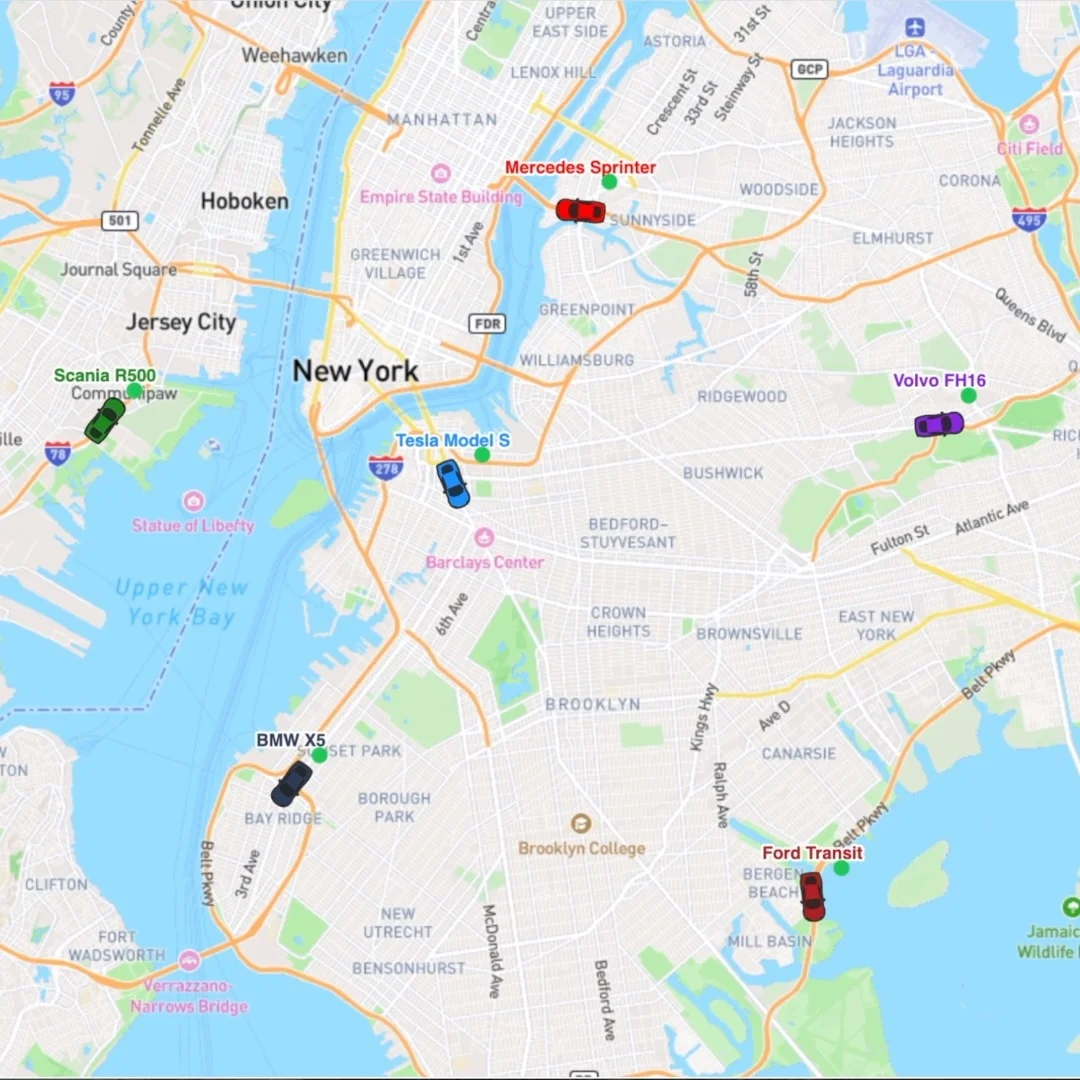
MyCarTracks live locations dashboard for vehicle tracking.

Trusted by businesses with vehicles in the field

Teams use MyCarTracks to launch vehicle tracking quickly, gain day-to-day operational clarity, and keep fleet activity visible without complex rollout.

Field service technician with work vehicle. Field services
Delivery driver with van and package. Delivery
Homecare worker beside vehicle. Homecare operations
Construction manager in high-visibility gear with fleet vehicles. Construction
Sales representative with company vehicle. Sales fleets

True real-time vehicle tracking

See active vehicles on a live map with frequent location updates so dispatch and operations teams can react faster when routes, jobs, or schedules change.

  • Live fleet positions with frequent location updates
  • Web-based manager console with no software install
  • Mobile and desktop access for field and office teams
Zoomed live vehicle location map in MyCarTracks.

Tracks history and long-term visibility

Review historical movement to understand what happened in the field, validate customer visits, and support follow-up decisions with complete trip context.

  • Analyze past vehicle movement on map views
  • Review route history and trip playback
  • Access historical records based on your active retention plan
Detailed historical track view in the MyCarTracks web app.

Easy installation for teams

Start quickly by inviting drivers and having them install the app. No technician visits or hardware rollout are required to get initial vehicle visibility.

  • Drivers install the app in a few minutes
  • Fleet onboarding with quick invite links
  • No mandatory technician setup for initial launch

Data synced and securely stored

Trip activity, fleet status, and operational records stay synchronized between driver apps and manager dashboards, with access controls for team roles.

  • Cloud sync across mobile app and web dashboard
  • Trip history, activity, and stats in one place
  • Role-based manager access controls
Secure cloud storage illustration in MyCarTracks.

Operations tools for day-to-day fleet control

Expenses & Refueling

Capture fuel and vehicle costs in one workflow so teams can reduce admin work, spot unusual spending patterns, and keep cleaner operational records.

Explore Expenses & Refueling
Expenses and refueling workflow in MyCarTracks.

Drive score

Use driving behavior indicators to coach safer habits and reduce risk across teams that spend most of the day on the road.

Explore Drive score
Drive score illustration in MyCarTracks.

Job dispatch

Assign tasks based on current vehicle location so dispatchers can balance workload and reduce delays in daily operations.

Explore Job dispatch
Job dispatch illustration in MyCarTracks.

Alerts

Get notified about important events so teams can react quickly to route deviations, unexpected stops, or configuration issues.

Explore Alerts
Alerts illustration in MyCarTracks.

Printable and operational reports

Build reporting outputs your operations and management teams can review, print, and share for daily control and historical analysis.

Printable and operational reports in MyCarTracks
  • Log book
  • Vehicle distances
  • Proof of work done
  • Job reports
  • Stop reports
  • Drive score reports
  • Track details

Control and reliability across driver apps

Keep rollout consistent and tracking reliable with operator-friendly controls built for real fleet environments.

Device condition logs

Identify app and device issues faster so your team can fix tracking problems before they affect operations visibility.

PIN lock

Prevent unauthorized settings changes and keep driver apps aligned with company tracking policies.

Managed app settings

Apply policy-aligned settings across driver apps so rollout stays consistent as your fleet grows.

Work hours

Define tracking windows to align location capture with operational schedules and reduce unnecessary noise.

Battery-friendly automatic detection

Run reliable background tracking designed to balance data quality with practical daily phone usage.

Multi-language support

Support mixed-language teams with app and dashboard experiences that are easier to adopt across regions.

Offline mode with later sync

Keep trip records during weak signal periods and sync data automatically when connectivity returns.

Shared maps for customer visibility

Share live map context when needed so customers stay informed about arrivals and on-site progress.

Need dedicated hardware?

Smartphone tracking is the default and fastest way to start with MyCarTracks. If your operation later needs dedicated devices, open tracker support is available as an optional DIY extension.

Supported tracking devices for MyCarTracks.

Use cases for vehicle and fleet tracking

How MyCarTracks vehicle tracking works

Create account and fleet

Set up your company account and fleet structure in the dashboard so managers can start tracking operations immediately.

Invite drivers

Send quick onboarding links to drivers so each team member can join your fleet without manual provisioning.

Drivers install app and start driving

Drivers install the mobile app, enable tracking permissions, and continue normal routes while the app captures activity.

Managers monitor live map, alerts, and reports

Use the dashboard to track live movement, review alerts, and generate reports for operations and follow-up decisions.

Trusted by businesses with vehicles in the field

Teams use MyCarTracks to improve live visibility, dispatch response, and day-to-day fleet control.

★★★★★

“We launched tracking in one afternoon. Drivers installed the app, and dispatch had live map visibility the same day.”

PN

P. Novak

Operations Manager

Field services

★★★★★

“Route history and geofence alerts gave our team real accountability without adding hardware to every vehicle.”

SK

S. Kim

Fleet Supervisor

Delivery operations

★★★★★

“MyCarTracks gave us clear vehicle activity and reporting from day one. It was easy for drivers to adopt.”

AR

A. Rivera

SMB Owner

Multi-vehicle team

★★★★★

“Mileage tracking used to be my monthly headache. Now I review and export in minutes.”

DL

D. Lee

Self-employed consultant

Mileage tracking

★★★★★

“Our reimbursements are cleaner and our managers spend less time validating logs.”

MO

M. Ortiz

Finance manager

SMB team

★★★★★

“Vehicle tracking visibility helped our dispatchers make faster decisions during busy days.”

NP

N. Patel

Operations lead

Fleet operations

★★★★★

“I stopped piecing trips together at the end of the week. The app keeps everything organized while I work.”

SC

S. Carter

Real estate advisor

Self-employed

★★★★★

“We rolled it out to the team fast and finally got one place for mileage logs, reports, and day-to-day oversight.”

AB

A. Brooks

Office manager

Growing business

★★★★★

“The reports are clear, the trip history is easy to review, and our drivers need far less follow-up from operations.”

JN

J. Nguyen

Fleet coordinator

Vehicle tracking

★★★★★

“Simple, easy to use”

JO

Joe OByrnes

Independent driver

Google Play review

★★★★★

“I use this app for work as a Transportation Engineer and everything is logical and easy to maneuver with.”

IP

Isaac Prizant

Transportation engineer

Google Play review

★★★★★

“Super easy and useful. Amazingly easy to use. Been testing offline functionality and then sync, then analysis online. Works great.”

AT

Art Thai

Field operations consultant

Google Play review

★★★★★

“Fantastic app. Works like a charm. Always know where your car is.”

JD

James Dunn

Service fleet supervisor

Google Play review

★★★★★

“This is my first time using this app. It did exactly what it said it would. I love this app and would recommend this app to anyone.”

JC

Justin Commee

Mobile sales representative

Google Play review

★★★★★

“Exceeded my high expectations. This app does what it says it can do. It's so easy to work and sooo awesome for work.”

TS

Todd Shaver

Field service technician

Google Play review

★★★★★

“Awesome. Can't do my job without it”

BS

Brett Slack

Delivery driver

Google Play review

★★★★★

“Impressive. This is the third of this kind of app I've tried and this one showed my route of the day on the map exactly where I've been or I'm at.”

JA

Junnell Accento

Route sales driver

Google Play review

★★★★★

“Very good, accurate. I don't normally rate apps. But this is a good one. Just what was needed to track cross country travel.”

JC

Jake Carter

Regional account manager

Google Play review

★★★★★

“Accurate and easy to use. As a private tutor I do about 5000 miles of very short trips each year. This app tracks them all to within 0.01 miles accurately.”

RH

Russ Hanush

Private tutor

Google Play review

★★★★★

“What a great app. No bother at all, just set it on auto and forget about it. Every movement tracked and logged, along with speed stats for each trip.”

SM

Sandile Mthethwa

Field support specialist

Google Play review

★★★★★

“This is a great product and has very good support.”

KR

Ken Rembold

Operations coordinator

Google Play review

★★★★★

“Great app and great service. Use on a daily basis and have never had any problems.”

DG

Donald Garrison

Owner-operator

Google Play review

★★★★★

“Perfect. I love this app, runs seamlessly in the background and records my trips near perfectly. Highly recommended.”

DC

David Cann

Independent contractor

Google Play review

★★★★★

“Easy to use and reliable. Never had a problem with this app. Does exactly what is needed, with reliable performance and minimal battery use.”

PS

Paul Smith

Fleet systems manager

Google Play review

★★★★★

“Fantastic app. Application works as described. Nice battery saving features. Simple to use on the mobile side as well as the server side.”

ER

Eric Robinson

Logistics coordinator

Google Play review

★★★★★

“Love it. Does what I need it to do in a simple manner. Keep up the good work!”

DS

David Swanson

Self-employed consultant

Google Play review

★★★★★

“The best trip tracker ever. It does what other trackers can't and it does it so well.”

TM

Tumo Maokisa

Field engineer

Google Play review

Vehicle tracking FAQ

Do I need hardware trackers to start vehicle tracking?

No. Smartphone-based tracking is the default setup, so teams can start by having drivers install the app. Hardware trackers are optional if your operation needs them later.

How real-time is vehicle position tracking?

Vehicle positions are updated frequently to support day-to-day operations visibility. The interval can start at every 2 seconds and can be adjusted based on your needs. Exact update behavior can also vary by app configuration, device settings, and connectivity.

Can I track vehicles with smartphones only?

Yes. MyCarTracks is designed to run with driver smartphones as the primary tracking setup for many SMB and fleet workflows.

What happens without mobile signal?

The app can continue collecting trip data and sync records when connectivity returns. Availability can vary based on device and OS conditions.

Can I set geofence and stop alerts?

Yes. You can configure geofence and related operational alerts to monitor important vehicle events and react faster in daily operations.

How do I onboard drivers quickly?

Use quick invite links from the manager dashboard, then drivers install the app and enable permissions to start tracking.

Can I manage app settings for the whole fleet?

Yes. Teams can use managed settings, policy controls, and app safeguards such as PIN lock to keep deployment consistent.

Which reports can I export?

MyCarTracks supports operational exports including log books, distances, stop details, job-related reports, and other fleet tracking outputs based on enabled modules.
Many useful articles and step-by-step guides are available in the MyCarTracks Help Center .

Start tracking your fleet in minutes

Use smartphones to get real-time vehicle visibility, alerts, and reports without complex setup.